Handle webhooks
Beta
Last updated: September 16, 2026
Before Checkout.com onboards your sub-entities, you must configure your webhook server to receive all necessary notifications throughout the onboarding process.
Subscribe to the following webhooks:
| Webhook | Description |
|---|---|
Sent when a sub-entity is successfully created. | |
Sent after a payment instrument passes verification. | |
Sent after a payment instrument fails verification. | |
Sent after a sub-entity passes its full due diligence checks. | |
Sent after a sub-entity fails its full due diligence checks. | |
Sent when payout capabilities become enabled for a sub-entity. | |
Sent when payout capabilities become disabled for a sub-entity. | |
Sent after the sub-entity passes the CSS checks (VMSS and Match) and its payment capabilities become enabled. | |
Sent when payment capabilities become disabled for a sub-entity. | |
Sent whenever a sub-entity's status changes. |
The sub-entity status also changes as the process progresses.
Information
For all possible statuses, see Sub-entity status.
The following graph shows you all the possible status updates as your sub-entity advances in the onboarding process:
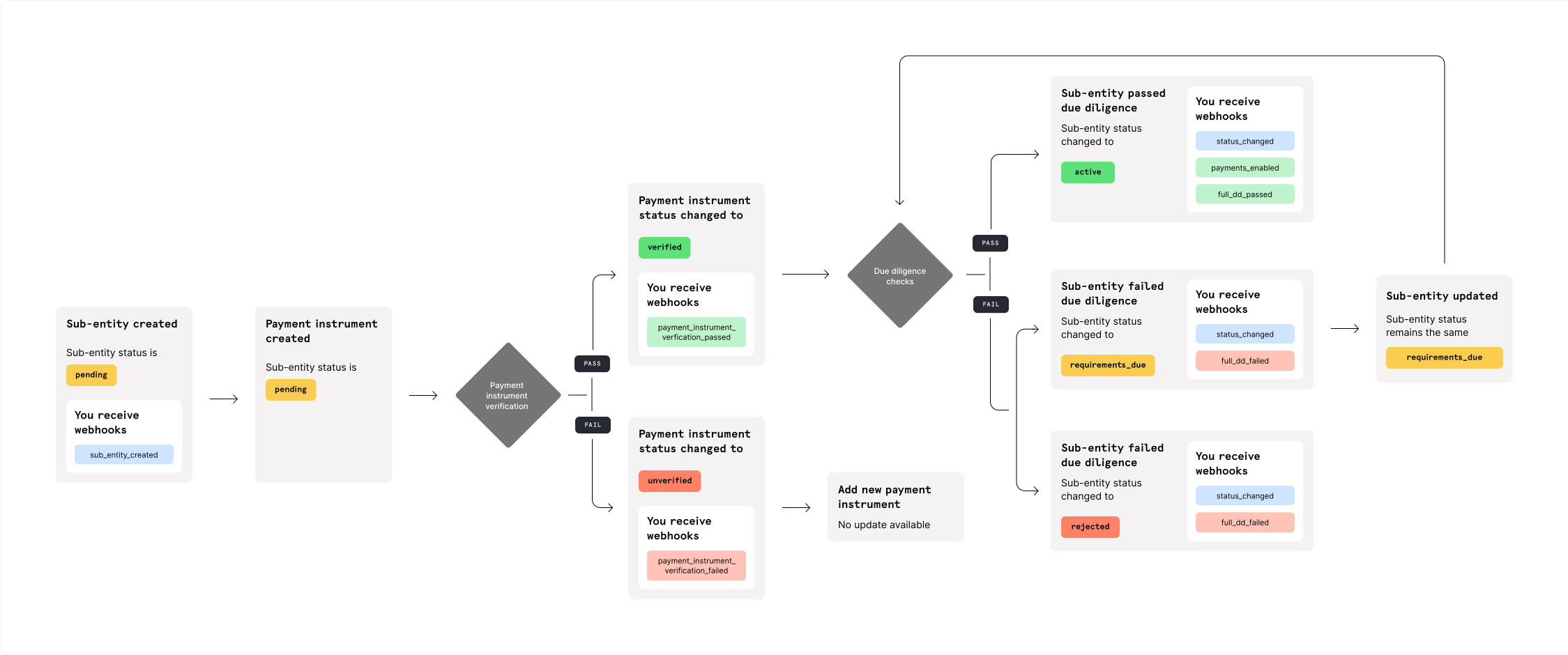
Information
If any required information is updated later, Checkout.com runs the verification again. If any subsequent checks fail, we send the Full DD failed, Payments disabled, and Payouts disabled webhooks.